
Antminer Z15 Pro Hashboard Specialists
The Z15 Pro is the newer, higher-hashrate Equihash miner — and it runs hotter than the original Z15. We specialize in the four faults Z15 Pro owners see most: overheating, temperature-sensor errors, hashrate drop, and "cannot find hashboard."
Overheating & Cooling
Thermal paste refresh, heatsink cleaning and thermal-path repair for a Z15 Pro that runs too hot or thermal-throttles.
Temperature Sensor Fault
Fixing "Temp NG" / 0°C and false temperature readings by repairing or replacing the on-board sensor chip.
Hashrate Drop
Restoring rated hashrate by locating dropped-out chips and unstable voltage domains — often heat-induced.
Board Not Detected
Repairing broken serial chains, dead core-voltage rails and comms faults behind a "cannot find hashboard" error.
Proven Track Record on eBay/Contract
100% Honest Feedback from Verified ASIC Owners
"Great guy, answered all my questions... Good fast work, best prices."
"Best service out there. Doesn't overcharge for repairs unlike other services. Definitely will be using again."
"Awesome service had it fixed and shipped back in a matter of days... highly recommend them."
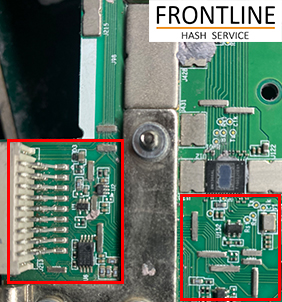
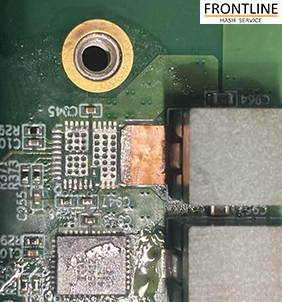
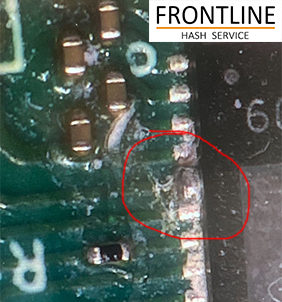
Z15 Pro overheated, dropped a board, then lost hashrate
A representative Antminer Z15 Pro repair covering the classic chain reaction: heat → temperature error → board drops out → hashrate falls.
- Reported symptom
- The Z15 Pro ran hot, then one board showed
Temp NG, dropped offline ("cannot find hashboard"), and total hashrate fell. - On-bench diagnosis
- The temperature sensor read 0°C (dead), and on the test fixture the serial chain broke mid-board — the clock reached the first chip but the data signal never returned. The core-voltage rail sagged on that domain. Dried thermal paste and dust had pushed chip temperatures well past spec.
- Root cause
- Sustained overheating killed the temperature sensor and thermally fatigued the solder under one ASIC, breaking the chain. Because the chips are series-wired, that one failure made the whole board undetectable and dropped the hashrate.
- The repair
- We replaced the failed temperature sensor, reflowed/replaced the fatigued ASIC with a genuine chip, restored the core-voltage rail, and refreshed the entire thermal interface (paste + cleaning) so it runs cool. The chain and board detection were re-verified on the fixture.
- Outcome
- All boards detected again, temperatures back in range, and full rated hashrate restored. The unit passed a 24-hour full-load burn-in with a healthy thermal curve before shipping back.
Representative case based on common Z15 Pro failure patterns and standard chip-level repair procedure. Every board is diagnosed individually — exact faults and pricing are confirmed after inspection.
Antminer Z15 Pro Repair — What We Fix
The Antminer Z15 Pro is the newer, higher-hashrate member of Bitmain's Z15 Equihash (Zcash) family. More hashrate means more heat, and heat is behind most Z15 Pro failures: dried thermal paste and clogged heatsinks push chip temperatures past spec, which kills temperature sensors, fatigues solder joints, and destabilizes voltage domains. The result shows up as overheating warnings, "Temp NG" readings, dropping hashrate, and boards that suddenly can't be found.
We treat the Z15 Pro at the chip level: refreshing the thermal interface so it runs cool, repairing or replacing failed temperature sensors, restoring broken serial chains and core-voltage rails so every board is detected, and replacing dropped-out ASIC chips with genuine Bitmain parts to bring hashrate back to spec. Every board finishes with a 24-hour full-load burn-in. Mail-in and on-site farm service are both available. Running the original model? See our Antminer Z15 / Z15J repair page.
Z15 Pro Repair — Frequently Asked Questions
Why is my Z15 Pro overheating or showing high temperatures?
The Z15 Pro runs hotter than the original Z15, so dried-out thermal paste, dust-clogged heatsinks and a weak or failing temperature sensor are the usual causes. We refresh the thermal interface, clean the board, and repair or replace faulty temperature-sensor chips so the board reads and cools correctly.
My Z15 Pro shows a temperature error or 0°C reading — can you fix it?
Yes. A "Temp NG" or 0°C reading usually means the on-board temperature-sensor chip or its power/signal path has failed. We diagnose the sensor circuit and reflow or replace the sensor so the board reports real temperatures again.
Why has my Z15 Pro hashrate dropped?
A hashrate drop usually means one or more ASIC chips have dropped out of the serial chain, or a voltage domain has become unstable — often triggered by heat. We locate the failing chip or rail on a test fixture and repair it at the chip level to restore rated hashrate.
My Z15 Pro cannot find a hashboard — what causes that?
A board that is not detected is usually a broken serial data chain, a dead core-voltage rail, or a control-board communication fault. Because the chips are wired in series, one break can make the whole board disappear. We trace the break and restore the chain and rails.
Do you offer on-site Z15 Pro repair for farms?
Yes — we provide on-site ASIC repair so mining farms can restore Z15 Pro units on their own floor without shipping downtime.
Related ASIC Repair Services
Need your Antminer Z15 Pro Repaired?
Professional mail-in and on-site repair for the Z15 Pro — overheating, temp, hashrate and board-detection faults fixed fast.